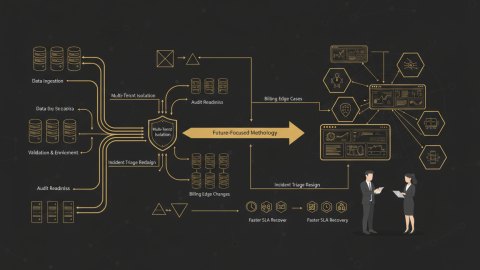
Migrating core business systems like CRM and ERP presents unique challenges, especially when it comes to billing and entitlements. A botched migration can trigger a cascade of issues, including incorrect billing, lost revenue, and, most critically, user churn. The goal is clear: a seamless transition that maintains service levels and avoids disrupting customer operations. We need a systematic approach, a migration blueprint with clearly defined cutover checkpoints, to navigate this complexity effectively.
Consider a scenario where a large e-commerce company is migrating its CRM and ERP systems to a new cloud infrastructure. The existing systems manage millions of customer subscriptions with intricate billing rules and entitlement configurations. Migrating this data accurately and efficiently is crucial to prevent billing errors and ensure uninterrupted service for its customers. Errors during the migration of billing limits and entitlements could lead to a large-scale service outage, resulting in financial losses and damage to customer relationships.

Compliance-Driven Entitlement Migration: A Staged Approach
Entitlement migration, especially in regulated industries, is heavily influenced by compliance requirements. These requirements often dictate the level of data validation, auditing, and security measures needed throughout the migration process. Neglecting these aspects can expose the organization to legal and financial risks. Building a compliance-driven approach into our migration from the outset reduces these risks. This section will discuss a phased migration strategy, breaking the process into manageable stages, and ensuring compliance requirements are embedded into each stage.
Phase 1: Data Discovery and Profiling
Begin by identifying all billing and entitlement data sources within the existing CRM and ERP systems. Thoroughly profile the data to understand its structure, quality, and relationships. This includes identifying critical data elements like subscription types, billing cycles, usage limits, and associated customer accounts. This initial profiling helps uncover potential data quality issues or inconsistencies that could hinder the migration process. Consider using data profiling tools to automate this process and generate comprehensive reports.
Phase 2: Target System Configuration
Configure the target CRM and ERP systems to accommodate the migrated billing and entitlement data. This involves defining data schemas, setting up validation rules, and configuring security policies to align with compliance requirements. Ensure that the target system can handle the expected data volume and transaction load. Create a detailed mapping document that outlines how each data element from the source system will be transformed and loaded into the target system.
Phase 3: Data Transformation and Cleansing
Transform and cleanse the identified data to ensure it aligns with the target system's data model and compliance requirements. Remove any duplicates or inconsistencies and correct any data errors. Use data transformation tools to automate this process and ensure data integrity. Implement data validation checks to verify that the transformed data meets predefined quality standards prior to loading into the target system.
Phase 4: Migration and Validation
Migrate the transformed and cleansed data to the target CRM and ERP systems. Conduct rigorous validation checks to ensure data accuracy and completeness. Compare data between the source and target systems to identify any discrepancies. Implement automated testing to verify that billing and entitlement processes function correctly in the target environment. Testing should include scenarios that validate a variety of billing conditions, limit configurations, and user access rights. Consider a parallel run approach for a subset of users and their entitlements.
Phase 5: Monitoring and Optimization
Monitor the performance of the migrated systems and identify areas needing optimization. This includes tracking latency, throughput, and error rates. Continuously refine the system configuration and data transformation processes to improve performance and ensure ongoing compliance with compliance requirements. Establish automated monitoring to detect anomalies that could impact the integrity of billing and entitlement data.
Regulatory Needs and Their Impact on Migration
Specific regulatory requirements can significantly impact the design and execution of a CRM and ERP migration, particularly concerning billing and entitlements. Understanding these requirements early is crucial for developing compliant migration strategies.
For example, GDPR regulations require strict data privacy and protection measures. When migrating billing data, ensure compliance with GDPR by anonymizing or pseudonymizing sensitive information where possible. Implement strong access controls to restrict unauthorized access to personal data. Maintain detailed audit logs to track data usage, modifications, and user activities.
Failure to comply with relevant regulations can result in severe penalties, including fines, legal action, and reputational damage. It's essential to involve legal and compliance teams throughout the migration process to ensure that all regulatory requirements are met.
Geo-Validation Rules: Managing Regional Entitlements
Many organizations offer services with geographically-specific entitlements. During migration, these rules must be accurately transferred to avoid disruption. This involves mapping the existing geographic rules to the new system and validating their functionality.
- Inventory Geo-Validation Logic: Audit all rules within CRM and ERP systems to avoid orphaned processes.
- Define a Migration Compatibility Strategy: To avoid data loss or errors in compliance, use parallel runs for geo-validation. Consider the volume when assessing risk and test with a subset of users instead of total number.
- Monitor Geo-Validation Outcomes: During the initial weeks, use monitoring dashboards to track issues such as incorrect entitlements or billing errors impacting customers in specific regions.
Logging Requirements: Enabling Audit Trails for Accountability
Comprehensive logging is critical for maintaining accountability and enabling effective troubleshooting during and after the migration. Implement logging at each stage of the migration process, capturing key events, data transformations, and errors. Logs should include timestamps, user identities, and detailed descriptions of the events. Securely store these logs in a centralized location and implement access controls to protect them from unauthorized access or modification. Regular analysis of these logs can help identify potential issues and optimize migration performance.
Audit Readiness: Demonstrating Compliance Post-Migration
The ultimate goal of a compliant migration is to demonstrate that the entire process was conducted according to regulatory standards. This requires generating detailed audit trails and reports. Develop a comprehensive documentation package that includes:
- Migration plan
- Data mapping specifications
- Data transformation rules
- Validation results
- Audit logs
- Compliance documentation
This documentation should be readily available for auditors and regulatory agencies upon request. Consider conducting internal audits prior to regulatory audits to identify any potential gaps in compliance. Review the steps and recommendations from the High-Load campaign runbook which outlines key steps for validation as well.
Anti-Patterns to Avoid During CRM & ERP System Migration
Knowing what to avoid is as vital as knowing what to do. Here are common anti-patterns that can derail a CRM and ERP system migration:
- Ignoring Data Quality: Migrating dirty data perpetuates existing issues and can lead to new problems in the target system.
- Insufficient Testing: Inadequate testing can result in production issues and costly rework.
- Lack of Change Management: Poor communication and training can lead to user resistance and adoption challenges.
- Neglecting Security: Security vulnerabilities during migration can expose sensitive data to unauthorized access.
- Overlooking Performance: Performance bottlenecks can degrade the user experience and impact operational efficiency.
- Poor Rollback Planning: Lack of a clear rollback plan can prolong the migration process and increase downtime if issues arise. We've discussed rollback in great detail in Cloud cost optimization action plan
Conclusion: A Blueprint for Success
Migrating CRM and ERP systems, particularly billing and entitlements, is a complex undertaking. By following a structured migration blueprint with clearly defined cutover checkpoints, businesses can minimize disruption, ensure compliance, and maintain high performance. Regular profiling, diligent data transformation and rigorous testing are core steps. A robust rollback strategy mitigates risk.
By focusing on data quality, compliance, security, and business continuity, you can achieve a successful migration that enhances your organization's operational efficiency and customer satisfaction. For a further discussion on tenant-aware observability best practices, review our article on the subject Tenant-Aware Observability for Telegram Bot Lead Qualification: Release Readiness and Post-Release Stabilization.
Need help architecting a smooth system migration? Our systems architecture services can help you avoid the pitfalls and achieve a seamless transition.
Related reads
Relevant offers
If this article matches your task, here are two offers you can use to move from insight to implementation without extra discovery.
Landing page redesign for conversion
I redesign key landing pages around decision logic so traffic does not stall in passive reading.
Catalog SEO module rollout for 1C-Bitrix
Catalog SEO is governed centrally: metadata, schema.org, redirects, sitemap, IndexNow and a supportable post-launch architecture.