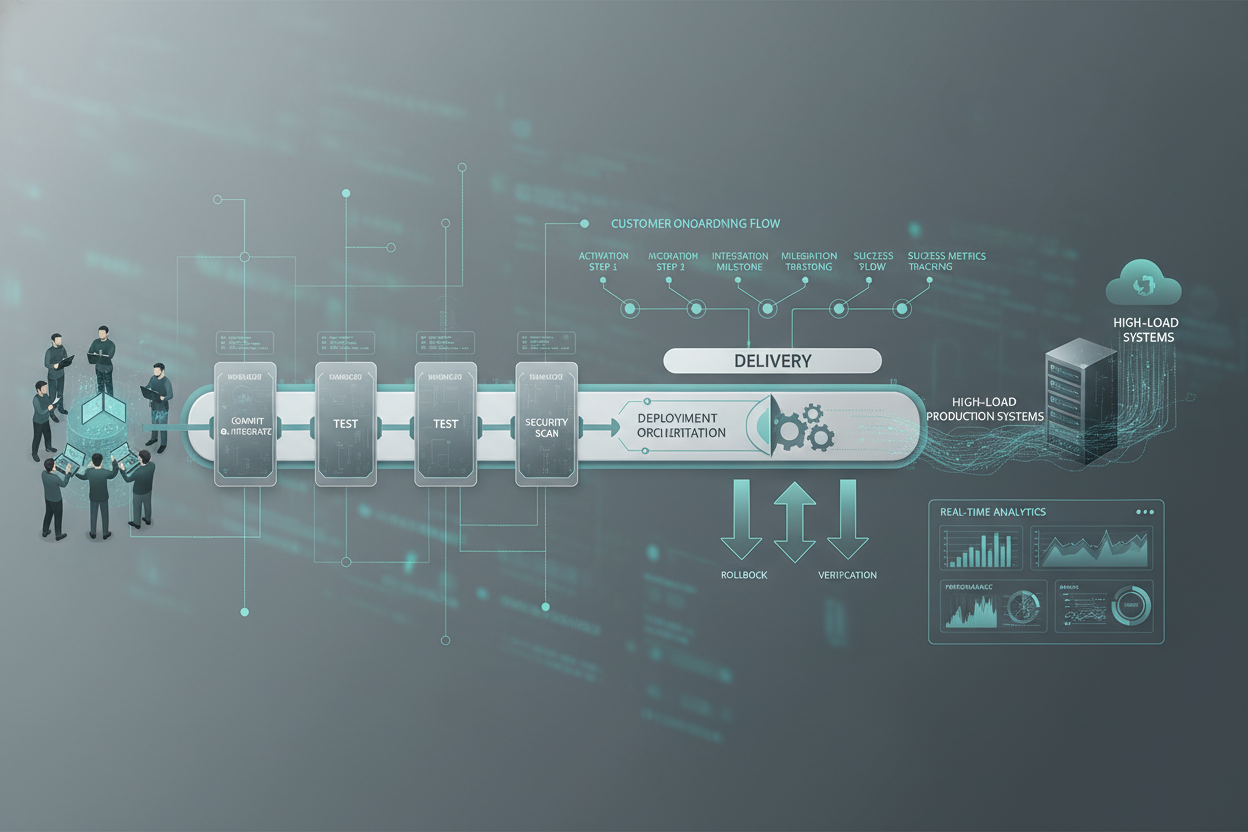
Managing CI/CD pipelines for high-load systems requires a meticulous approach. It goes beyond merely automating deployments. It involves understanding the intricate interplay between infrastructure, application code, and operational processes. This playbook will guide you through key considerations and provide practical insights for building resilient and efficient pipelines.
FAQ: CI/CD for High-Load Systems
Before diving into implementation details, let's address some common questions.
Q: What defines a 'high-load' system in the context of CI/CD?
A: A high-load system is characterized by a substantial volume of concurrent users, transactions, or data processing tasks. CI/CD pipelines for such systems must handle frequent deployments without disrupting service availability or performance. Key metrics include transactions per second (TPS), latency, error rates, and resource utilization. If these metrics significantly degrade during or after deployments, your CI/CD strategy needs re-evaluation. I aim for zero downtime deployments, a key indicator of a mature CI/CD practice.
Q: How does CI/CD differ for high-load versus low-load applications?
A: The core principles remain the same, but the emphasis shifts towards risk mitigation and performance optimization. High-load systems demand more rigorous testing, finer-grained deployment strategies (e.g., canary deployments, blue-green deployments), and robust rollback mechanisms. Automation becomes even more critical to reduce manual errors and ensure consistent execution. Resource provisioning and infrastructure management are also more complex, requiring careful consideration of scaling policies and resource allocation.
Q: What are the key benefits of CI/CD in a high-load environment?
A: The primary benefit is faster time-to-market for new features and bug fixes. However, in a high-load context, CI/CD also enhances system stability by facilitating quicker identification and resolution of performance bottlenecks and defects. Improved automation reduces the risk of human error during deployments. Continuous feedback loops provide valuable insights into system behavior under load, enabling proactive optimization.
Expanding on Core CI/CD Principles
Understanding the core principles of CI/CD is critical for success. I will detail key concepts and their adaptation to high-load scenarios.
Continuous Integration: Code Quality and Early Bug Detection
Continuous Integration focuses on merging code changes frequently into a central repository, followed by automated builds and tests. In a high-load environment, this process must include:
- Unit Tests: Verify the functionality of individual code components.
- Integration Tests: Ensure that different system components work together correctly.
- Load Tests: Simulate realistic user traffic to identify performance bottlenecks.
- Security Scans: Detect potential vulnerabilities in the code.
- Code Analysis: Identify code quality issues and enforce coding standards.
The goal is to catch problems early in the development cycle, before they impact the production environment. Load tests must mirror production traffic patterns as closely as possibility.
Continuous Delivery: Automating the Release Process
Continuous Delivery extends CI by automating the release process. This involves:
- Automated Deployments: Deploying code to various environments (e.g., staging, production) with minimal manual intervention.
- Infrastructure as Code (IaC): Managing infrastructure using code, ensuring consistency and repeatability.
- Configuration Management: Automating the configuration of servers and applications.
- Monitoring and Alerting: Tracking system performance and alerting when issues arise.
For high-load systems, it's crucial to use deployment strategies that minimize downtime, such as blue-green deployments or canary releases. I have found that Infrastructure as Code crucial, enabling me to quickly scale system resources on demand.
Real-World Configurations: Pipelines and Infrastructure
Let's look at practical implementation patterns.
Example CI/CD Pipeline for a High-Load API
- Code Commit: Developers commit code changes to a central repository.
- Build: The CI system automatically builds the application and runs unit tests.
- Static Analysis: Code is scanned for vulnerabilities and code quality issues.
- Deploy to Staging: The application is deployed to a staging environment that mirrors production.
- Automated Tests: Integration tests, load tests, and security tests are executed against the staging environment.
- Manual Approval (Optional): A manual approval step may be required before deploying to production.
- Deploy to Production: The application is deployed to the production environment using a blue-green or canary deployment strategy.
- Monitoring: System performance is continuously monitored.
- Rollback (if necessary): An automated rollback mechanism is in place to revert to the previous version if issues arise.
This pipeline should be fully automated, from code commit to deployment. Monitoring is key – after deployment, I continuously watch key metrics to catch any performance anomalies quickly.
Infrastructure as Code (IaC) Considerations
Managing infrastructure with code is crucial for scalability and consistency. Consider these aspects:
- Version Control: Store infrastructure configurations in a version control system.
- Automated Provisioning: Use tools to automate the provisioning of servers, networks, and other resources.
- Idempotency: Ensure that infrastructure configurations can be applied multiple times without causing unintended side effects.
- Testing: Test infrastructure configurations to ensure they are correct.
For instance, if using Terraform, you would define your infrastructure resources (e.g., VMs, databases, load balancers) in Terraform configuration files. These files are then applied to create or modify the infrastructure. The benefit is increased speed decreased errors, and easily audited history of infrastructure modifications.
Edge Cases and Error Handling
High-load systems often expose edge cases and unexpected errors. Robust error handling and rollback strategies are essential.
Handling Deployment Failures
Deployment failures can occur due to a variety of reasons, such as:
- Configuration Errors: Incorrect or missing configuration settings.
- Code Defects: Bugs in the code that were not caught during testing.
- Infrastructure Issues: Problems with the underlying infrastructure, such as network outages or server failures.
Implement automated rollback mechanisms that can quickly revert to the previous version of the application if a deployment fails. This might involve switching traffic back to the old environment in a blue-green deployment, or rolling back the code changes in a canary release. Regularly test the rollback procedure.
Database Migrations
Database migrations can be a significant source of downtime, especially in high-load environments. Use techniques like:
- Online Schema Changes: Perform schema changes without taking the database offline.
- Blue-Green Deployments for Databases: Deploy a new version of the database schema to a separate environment, and then switch traffic to the new environment.
- Canary Migrations: Apply database migrations to a small subset of the data, and then gradually roll them out to the rest of the data.
Consider using tools such as database migration frameworks to automate the process and minimize the risk of errors. Carefully plan all database migrations and test them thoroughly in a non-production environment.
Reference Code and Configuration Snippets (Illustrative)
Let's consider a simplified example of a deployment script using a fictional deployment system:
# Pseudo-code for a deployment script

function deploy_app {
  # 1. Stop the current application
  stop_application

  # 2. Download the new version
  download_new_version $VERSION

  # 3. Apply database migrations
  apply_database_migrations

  # 4. Start the new application
  start_application

  # 5. Run smoke tests
  run_smoke_tests

  # 6. If smoke tests fail, rollback
  if [ $SMOKE_TESTS_FAILED -eq 1 ]; then
    rollback_deployment
  fi
}

function rollback_deployment {
  # Revert to the previous version
  revert_to_previous_version
  start_application
}

deploy_app
This is a very basic example, you need robust system capable perform the steps accurately and with high degree of automation.
Wrap-up: Achieving Stability and Velocity
Implementing CI/CD for high-load systems is an ongoing process. It requires careful planning, continuous monitoring, and a willingness to adapt your strategies as the system evolves. The key is to balance the need for rapid development with the need for system stability and performance.
By focusing on automation, rigorous testing, and robust error handling, you can build CI/CD pipelines that enable you to deliver new features and bug fixes quickly and reliably, without compromising the stability of your high-load system. Remember to leverage Metrics-Driven Observability: Architecting for Operational Excellence. You also ensure alignment with Product Architecture for B2B: A Focus on Continuous Value Delivery to achieve excellence. My experience suggests that embracing Orchestrating business value: a deep dive into business process automation and analytics platforms to find further efficiencies can also be transformative. Need help implementing such a system? Let's discuss how I can assist your organization with its system architecture and DevOps maturity journey through my services.
Related reads
Checklist for Database Migrations in CI/CD
To ensure smooth and safe database migrations within your CI/CD pipeline for high-load systems, consider this checklist:
- Migration Planning:
- Define the migration steps clearly.
- Identify potential risks and mitigation strategies.
- Estimate the migration time and resource requirements.
- Environment Preparation:
- Set up a dedicated testing environment that mirrors production.
- Populate the testing environment with a representative dataset.
- Migration Execution:
- Use a database migration tool to automate the process.
- Apply migrations in a consistent and repeatable manner.
- Monitor the migration process closely for errors and performance issues.
- Verification and Validation:
- After migration, verify that the schema changes have been applied correctly.
- Validate the data integrity by running tests and queries.
- Check the application's functionality to ensure it works as expected.
- Contingency Planning:
- Develop a rollback plan in case the migration fails.
- Test the rollback plan to ensure it works effectively.
- Monitoring and Alerting:
- Set up monitoring to track key database metrics during and after the migration.
- Configure alerts to notify you of any issues or anomalies.
Anti-Patterns in CI/CD for High-Load Systems
Avoiding common anti-patterns is crucial for a successful CI/CD implementation. Here are some to watch out for:
- Manual Deployments: Relying on manual steps in the deployment process increases the risk of human error and inconsistencies. Automate everything.
- Ignoring Performance Testing: Neglecting performance testing until late in the cycle can lead to surprises in production. Integrate performance tests into the CI/CD pipeline.
- Lack of Rollback Strategy: Not having a well-defined and tested rollback strategy can result in prolonged downtime in case of deployment failures.
- Ignoring Database Migrations: Treating database migrations as an afterthought can cause significant issues. Plan your DB changes.
- Insufficient Monitoring: Failing to monitor key metrics after deployment makes it difficult to detect and resolve issues quickly.
- Large, Infrequent Deployments: Deploying large changes infrequently increases the risk of errors and makes it harder to pinpoint the source of problems. Strive for smaller, more frequent deployments.
- Inconsistent Environments: Differences between development, staging, and production environments can lead to unexpected behavior in production. Use IaC to ensure consistency.
Canary Deployments: Gradual Rollouts for Stability
Canary deployments are a powerful technique to mitigate risks during releases, especially in high-load environments. The idea is to release the new version of the application to a small subset of users or servers before rolling it out to the entire infrastructure. This allows you to detect and address any issues early on, minimizing the impact on the majority of users.
Steps for Implementing Canary Deployments
- Select a Canary Group: Choose a small percentage of users or servers to be part of the canary group. This group should be representative of the overall user base or server population.
- Deploy to Canary: Deploy the new version of the application to the canary group.
- Monitor Key Metrics: Continuously monitor key application and infrastructure metrics, such as response time, error rate, and CPU utilization. Compare these metrics with the baseline performance of the existing version.
- Analyze Results: If the metrics indicate any issues, such as increased error rates or performance degradation, stop the rollout and investigate the problem.
- Rollout to Full Production: If the metrics are within acceptable limits, gradually increase the percentage of users or servers running the new version until it is deployed to the entire infrastructure.
For instance, I might start by deploying a new version to 5% of application servers behind a load balancer. Then I'll compare critical metrics like average response time, the number of errors, average CPU utilization, and memory usage of canary servers VS overall server fleet for 1-2 hours. After being confident in the stability, I will update the rest of the servers, all while keeping a close eye on the metrics. Having a rollback plan to the previous version is a must, in case something goes wrong.
Feature Flags: Decoupling Deployments from Releases
Feature flags (also known as feature toggles) are a technique that allows you to enable or disable certain features of your application at runtime, without deploying new code. This can be useful for several reasons:
- Testing in Production: You can enable a new feature for a small group of users in production to gather feedback and identify any issues before releasing it to everyone.
- Phased Rollouts: You can gradually roll out a feature to a larger audience over time, monitoring its performance and stability along the way.
- Emergency Shutdown: If a feature is causing problems, you can quickly disable it without having to deploy a new version of the application.
- A/B Testing: You can use feature flags to run A/B tests, comparing the performance of different versions of a feature.
Considerations for Feature Flag Implementation
- Flag Management: Implement a system for managing and storing feature flags. This could be a simple configuration file or a dedicated feature flag management service.
- Code Integration: Wrap the code for your features with feature flag checks. This allows you to easily enable or disable the feature at runtime.
- Testing: Test your feature flags thoroughly to ensure they work as expected.
- Clean Up: Remove feature flags once they are no longer needed. Otherwise, they can clutter your code and make it harder to maintain.
Relevant offers
If this article matches your task, here are two offers you can use to move from insight to implementation without extra discovery.