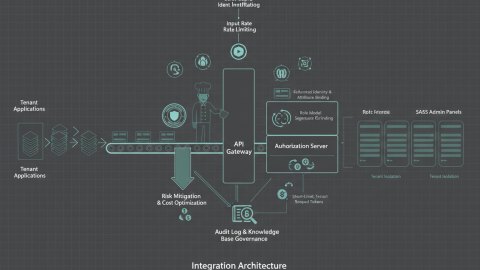
Zero-trust architecture operates on the principle of "never trust, always verify." Instead of assuming trust based on network location, every user and device must be authenticated, authorized, and continuously validated before being granted access to resources. GeoIP enrichment adds a crucial layer of context to this process, allowing you to factor location into your access control decisions. This workshop provides a practical, step-by-step guide to building such a system.

What You'll Learn
- Understanding the core principles of zero-trust access.
- Integrating GeoIP data into your authentication and authorization flows.
- Creating risk scores based on geographic location and other factors.
- Implementing context-aware access policies.
- Debugging and troubleshooting your zero-trust implementation.
Scenario Setup: A Web Application with Sensitive Data
Let's consider a scenario where you have a web application that stores sensitive user data. You want to implement zero-trust access to ensure that only authorized users from specific locations can access this data. The key is to use a GeoIP API like GeoIP.space to enrich all requests and implement granular rules.
Step 1: Define Your Access Policies
Before you start implementing anything, you need to define your access policies. These policies should specify:
- Which users or roles should have access to the application.
- From which geographic locations access should be allowed.
- Any other contextual factors that should be considered (e.g., time of day, device type).
For example:
- Only users with the role "administrator" should be able to access the entire application.
- Users from the United States and Canada should have full access to their accounts.
- Users from other countries should only be able to view their profile information but not make any changes.
- Any user attempting to access the application from a known high-risk country should be blocked.
These policies will inform how you integrate GeoIP data into your access control system.
Step 2: Setting up the Development Environment
For this example, we'll assume you are using Python with a framework like Flask or Django. Make sure you have the following installed:
- Python 3.7 or higher
- pip
- A Python virtual environment (recommended)
- Your preferred web framework (Flask or Django)
Geo Enrichment Demo: Integrating GeoIP Data
The core of this architecture lies in enriching each request with GeoIP data. This involves capturing the user's IP address and querying a GeoIP API to obtain location information. Then, you use that information to make access control decisions.
Step 3: Capturing the User's IP Address
The first step is to capture the user's IP address. This can be done using the request object in your web framework. For example, in Flask:
from flask import Flask, request

app = Flask(__name__)

@app.route('/')
def hello_world():
    ip_address = request.remote_addr
    return f'Your IP address is: {ip_address}'
In Django:
from django.http import HttpResponse

def index(request):
    x_forwarded_for = request.META.get('HTTP_X_FORWARDED_FOR')
    if x_forwarded_for:
        ip_address = x_forwarded_for.split(',')[0]
    else:
        ip_address = request.META.get('REMOTE_ADDR')
    return HttpResponse(f"Your IP address is: {ip_address}")
Important: Be aware of the potential for IP address spoofing, especially when using the X-Forwarded-For header. Implement proper validation and security measures to mitigate this risk.
Step 4: Querying the GeoIP API
Next, you need to query GeoIP API to get location information for the user's IP address. Register for API key at /dashboard/auth/ and then perform the API call. You will need an HTTP client library like requests:
import requests

GEOIP_API_KEY = 'YOUR_API_KEY' # Replace with your API key
GEOIP_API_URL = 'https://geoip.space/api/v1/geoip?ip={ip}&key={key}'

def get_geoip_data(ip_address):
    url = GEOIP_API_URL.format(ip=ip_address, key=GEOIP_API_KEY)
    try:
        response = requests.get(url)
        response.raise_for_status()  # Raise an exception for bad status codes
        data = response.json()
        return data
    except requests.exceptions.RequestException as e:
        print(f"Error querying GeoIP API: {e}")
        return None
Step 5: Storing GeoIP data in user session
Keep the data for the future to save API calls. For example, store needed fields in session.
from flask import Flask, request, session

# ... previously defined functions

@app.route('/')
def hello_world():
    ip_address = request.remote_addr
    geoip_data = get_geoip_data(ip_address)

    if geoip_data:
        session['country_code'] = geoip_data.get('country_code')

    return f'Your IP address is: {ip_address}'
Risk Scoring Demo: Evaluating Access Risk
Based on the GeoIP data, you can calculate a risk score that indicates how likely a particular access attempt is to be malicious. This risk score can then be used to make more informed access control decisions. For example, requests from countries with a high incidence of fraud could be assigned a higher risk score.
Step 6: Implement Risk Scoring Logic
Create a function to calculate the risk score based on the GeoIP data. This function should consider factors such as:
- The country of origin.
- Whether the country is known to be a source of malicious traffic.
- The distance between the user's current location and their usual location (if known).
def calculate_risk_score(geoip_data):
    risk_score = 0
    country_code = geoip_data.get('country_code')

    # Example: High-risk countries
    high_risk_countries = ['CN', 'RU', 'VN']
    if country_code in high_risk_countries:
        risk_score += 50

    # Example: Unknown location
    if not country_code:
        risk_score += 20

    return risk_score
Step 7: Enforce Context-Aware Access Policies
Now that you have a risk score, you can enforce context-aware access policies based on the user's location and other factors. If the risk score is above a certain threshold, you can deny access, require multi-factor authentication, or redirect the user to a honeypot.
from flask import session, redirect, url_for

@app.route('/protected')
def protected_route():
    country_code = session.get('country_code')

    # Enforce access policies based on GeoIP data
    if country_code == 'RU':
      return "Access Denied"
    elif country_code == 'US':
      return "Welcome, US user!"
    else:
      return "Access granted"
Consider building an IP address reputation list based on your application's abuse patterns. See /examples/article/proxy-detection for building such a list.
Debugging & Troubleshooting
Implementing a zero-trust architecture can be complex, and debugging is an essential part of the process.
Common Anti-Patterns
- Over-reliance on GeoIP data alone: GeoIP data is not foolproof. It can be inaccurate or easily spoofed. Always combine GeoIP data with other security measures, such as multi-factor authentication and behavioral analysis.
- Ignoring VPNs and proxies: Users can easily bypass GeoIP restrictions by using VPNs or proxies. Implement techniques to detect and block these tools.
- Failing to update GeoIP databases: GeoIP databases are constantly changing. Make sure to keep your database up-to-date to ensure accurate location information.
Common Debugging Steps
- Verify IP address capture: Double-check that you are correctly capturing the user's IP address.
- Inspect GeoIP data: Use a tool like
curlor Postman to directly query the GeoIP API and inspect the data being returned. - Review your access Policies: Ensure that your access policies are correctly defined and that they are being enforced as expected.
- Check the logs: Examine your application logs for any errors or warnings related to GeoIP integration or access control.
Takeaways: Securing Your Application with Zero-Trust
By following this step-by-step guide, you can implement a robust zero-trust access architecture that leverages GeoIP data to enhance the security of your application. Remember to continuously monitor your system, update your policies, and adapt to the ever-changing threat landscape.
Ready to implement these steps? Sign up for a GeoIP.space account and start enhancing your application security today!
Relevant offers
If this article matches your task, here are two offers you can use to move from insight to implementation without extra discovery.
Antifraud rules for checkout and payment forms
I deploy a practical antifraud layer in checkout to reduce disputed payments and manual review overhead.
MVP development for startup
I deliver MVP scope focused on hypothesis validation, release speed and controlled production evolution.